RingDue reminder call app logoSee calls

Google Calendar call reminders

Add phone call reminders to important calendar events.

RingDue works alongside Google Calendar so selected meetings, appointments, classes, and deadlines can get a stronger reminder call.

Team RingDue - Last updated May 27, 2026 - Last reviewed May 27, 2026

See how it works

Everyday India use cases

  • Call 15 minutes before a client meeting
  • Call before a school meeting or class
  • Call before a doctor appointment or lab test
  • Call before a payment or filing deadline

Quick answer

A Google Calendar call reminder is a phone call before a selected calendar event. RingDue works as an extra reminder layer for important meetings, appointments, classes, deadlines, and family events where a normal calendar notification may be too easy to miss.

Useful details before you choose RingDue

Who it is for

  • Professionals who already plan meetings in Google Calendar but miss normal alerts.
  • Parents and families who keep appointments, school events, classes, and deadlines in Calendar.
  • Users who want calls only for selected important events, not every calendar entry.
Exact reminder examples

  • Call 10 minutes before client meetings.
  • Call 30 minutes before school meetings.
  • Call 1 hour before doctor appointments.
  • Call before selected calendar deadlines.

How RingDue works

  • Connect or use the Google Calendar workflow available in RingDue.
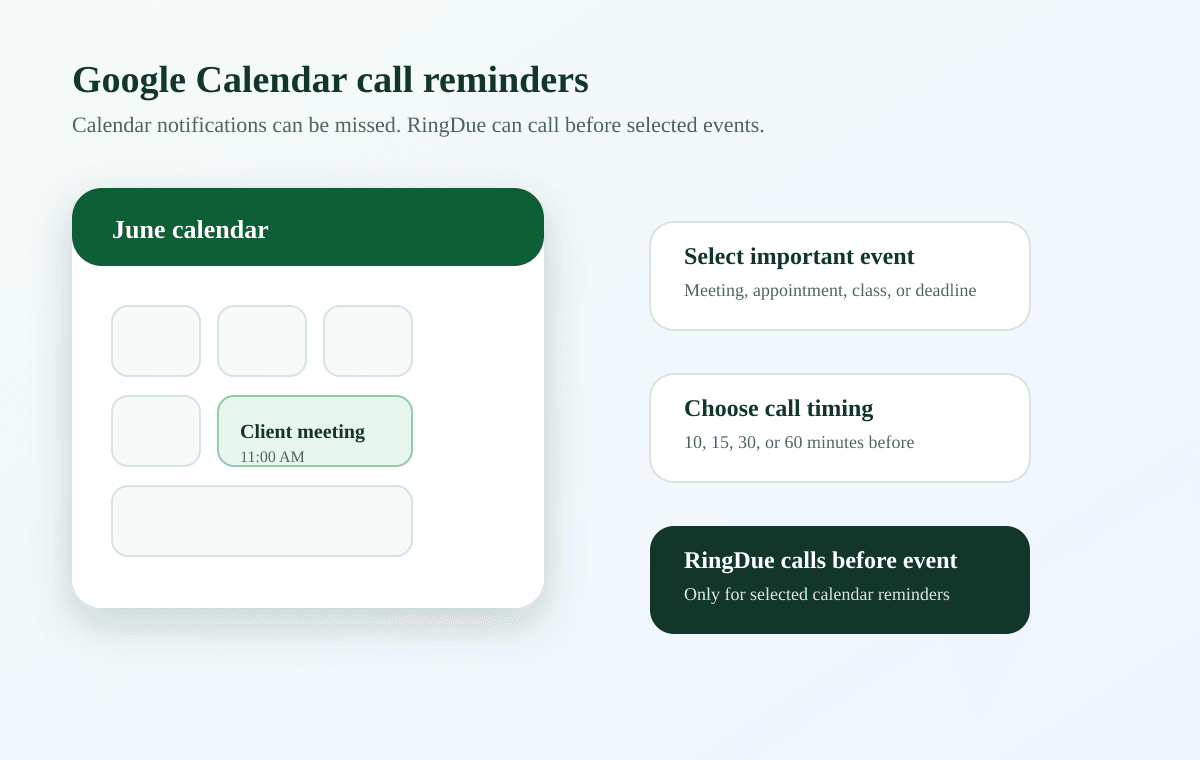
  • Select the important events that need a call reminder.
  • Choose how early RingDue should call before the event.
  • RingDue calls for selected events and leaves ordinary calendar events as normal notifications.

Limits and compliance

  • RingDue complements Google Calendar; it does not replace the calendar.
  • Calls should be enabled selectively to avoid call fatigue.
  • Calendar call reminders are for personal events and opted-in users, not promotional calling.

Pricing and call limits

  • Free trial credits can test a few selected event calls.
  • Plus and Pro plans support higher monthly call reminder usage.
  • Each calendar reminder call, retry, or backup escalation can count against call credits.

For current call-credit details, see the RingDue pricing page. Plan limits can change during rollout because outbound call costs and usage patterns vary.

RingDue Google Calendar connection flow for call reminders

Calendar event to reminder call flow

Select important calendar events and use calls only where a normal alert may be missed.

How RingDue helps

Calendar for planning

Keep events organized in Google Calendar while using calls only for the events that need extra attention.

Calls before selected events

Use reminder calls for meetings, school events, doctor appointments, travel timings, and important deadlines.

Avoid notification overload

RingDue is designed to keep calls intentional, so every event does not need to become a phone call.

Best for

  • Parents managing classes, school tasks, and pickup reminders.
  • Families managing medicines, bills, appointments, and household work.
  • Professionals managing meetings, follow-ups, and deadlines.
  • Caregivers managing care routines and appointment reminders.
  • Students managing coaching classes, exams, and submissions.

Not for

  • Bulk calling or unsolicited calling.
  • Marketing calls or telemarketing.
  • Lead generation or sales dialers.
  • Calling people who have not opted in.
  • Promotional campaigns or third-party outreach.

Built for personal reminders only

RingDue calls only for reminders you create or explicitly opt into. It is for personal reminder workflows, not promotional calling, sales outreach, or unsolicited campaigns. You can disable call reminders, pause messages, and delete your account data.

Responsible reminder calls

RingDue places calls only for reminders users create or explicitly opt into.

RingDue is not for bulk calling, lead generation, sales outreach, or marketing campaigns.

Users can disable call reminders, cancel reminders, and request account deletion.

Use phone calls for important reminders so calls stay useful and intentional.

Trust and control

Reminder calls should stay personal and intentional.

User-created reminders only

RingDue calls for reminders users create or explicitly approve.

Opt-in reminder calls

Phone calls are tied to verified, opt-in personal reminder workflows.

Disable calls anytime

Users can cancel reminders, pause calls, and request account deletion.

Use calls carefully

Call reminders work best for important tasks, not every small notification.

Not for marketing calls

RingDue is not for bulk calling, lead generation, spam, or promotions.

Frequently asked questions

Does RingDue replace Google Calendar?

No. RingDue complements Google Calendar by adding phone call reminders for selected important events.

Can I get a phone call before a Google Calendar event?

Yes. RingDue supports Google Calendar call reminder workflows for selected meetings, classes, appointments, deadlines, and family events.

Which calendar events should use call reminders?

Use calls for meetings, classes, appointments, travel, payments, and deadlines that need extra attention.

Can users choose when RingDue calls?

Yes. Users can choose a call time before the event based on the reminder workflow available to them.

Start with one WhatsApp reminder.

Send a WhatsApp text or voice note. RingDue understands the reminder and calls you before important tasks, classes, medicines, meetings, and family responsibilities.